I track my money with Firefly III , the self-hosted personal finance manager. It’s great at collecting data, and the web UI is perfect for live, on-the-spot charts. But I wanted something I could export, archive, and even print for long-term record.
I couldn’t find anything which suited my needs, so I built it myself: firefly-reports .
What it does
Point it at your Firefly III instance, pick a year, and it generates 26 financial reports in PDF and Excel: cash flow statement, income vs expense, net worth, tax summary, budget vs actual, bills and subscriptions, a KPI scorecard with burn rate and cash runway, year-over-year comparisons, a liquidity forecast, a General Journal with double-entry bookkeeping, and more.
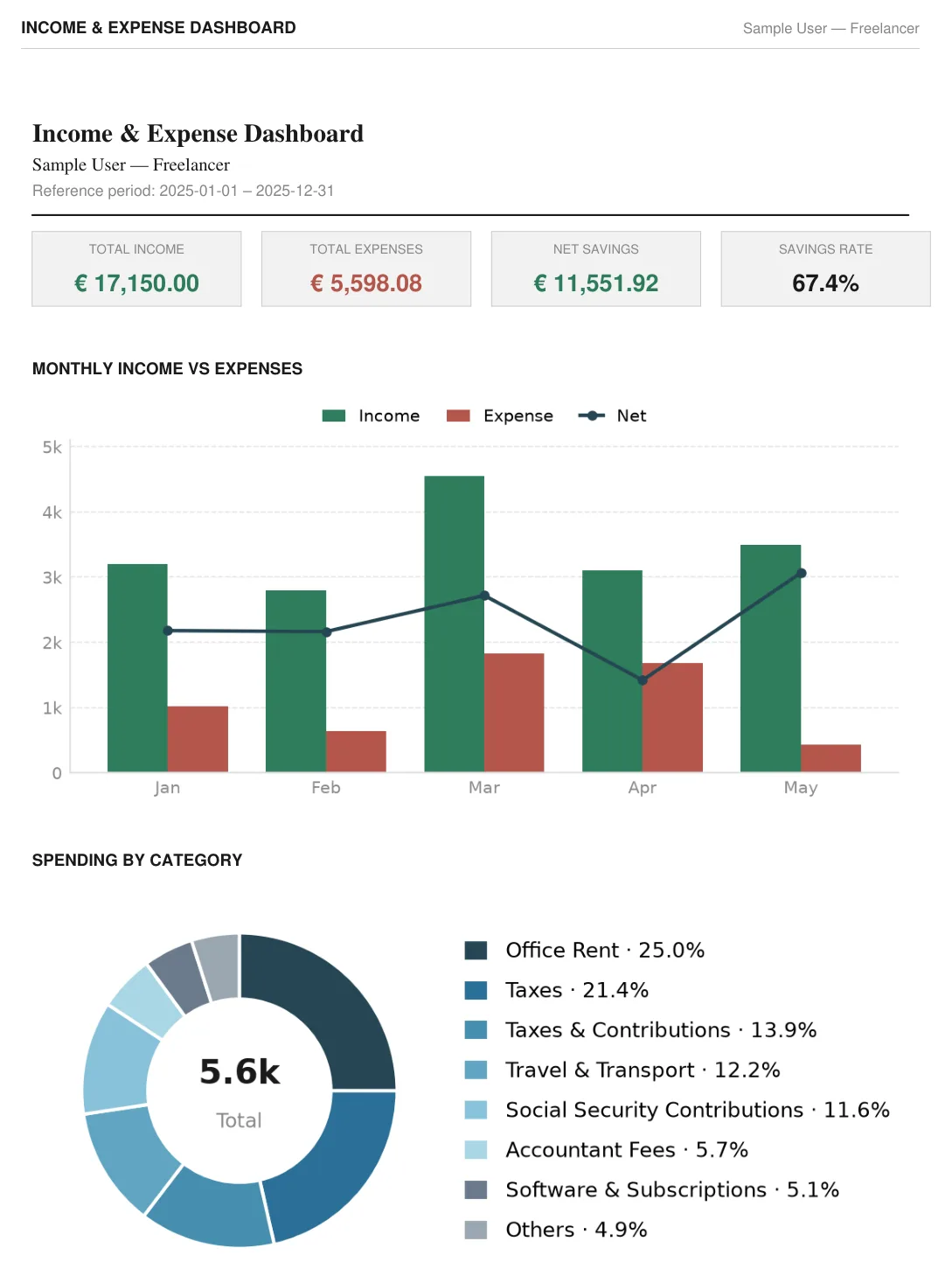
This is what the output actually looks like — here the Income & Expense dashboard, generated from the demo data set:
The package is published on PyPI as firefly-iii-reports
and installs a firefly-reports CLI. Of course you can still run it from source if you prefer.
The 26 reports
The full set, straight from a run against a year of data:
- Core financials — Cash Flow Statement, Income vs Expense, Net Worth, Transaction Register, Account Statements, Cumulative Cash Flow
- Planning and control — Budget vs Actual, Budget Performance Forecast, Savings Goals, Bills & Subscriptions, Liabilities
- Analysis — KPI Scorecard (burn rate, cash runway, savings rate, income concentration), Expense Trend, Income by Client, Income & Expense and KPI dashboards
- Tax and records — Tax Summary, Tagged Report, General Journal with double-entry bookkeeping, Transaction Audit Log
- Drill-down ledgers — Category Ledger, Payee Ledger, All Tags Ledger, Linkage & Reimbursement Report
- Long-term view — Year-over-Year comparison, Historical Growth, Liquidity Forecast, instance Summary
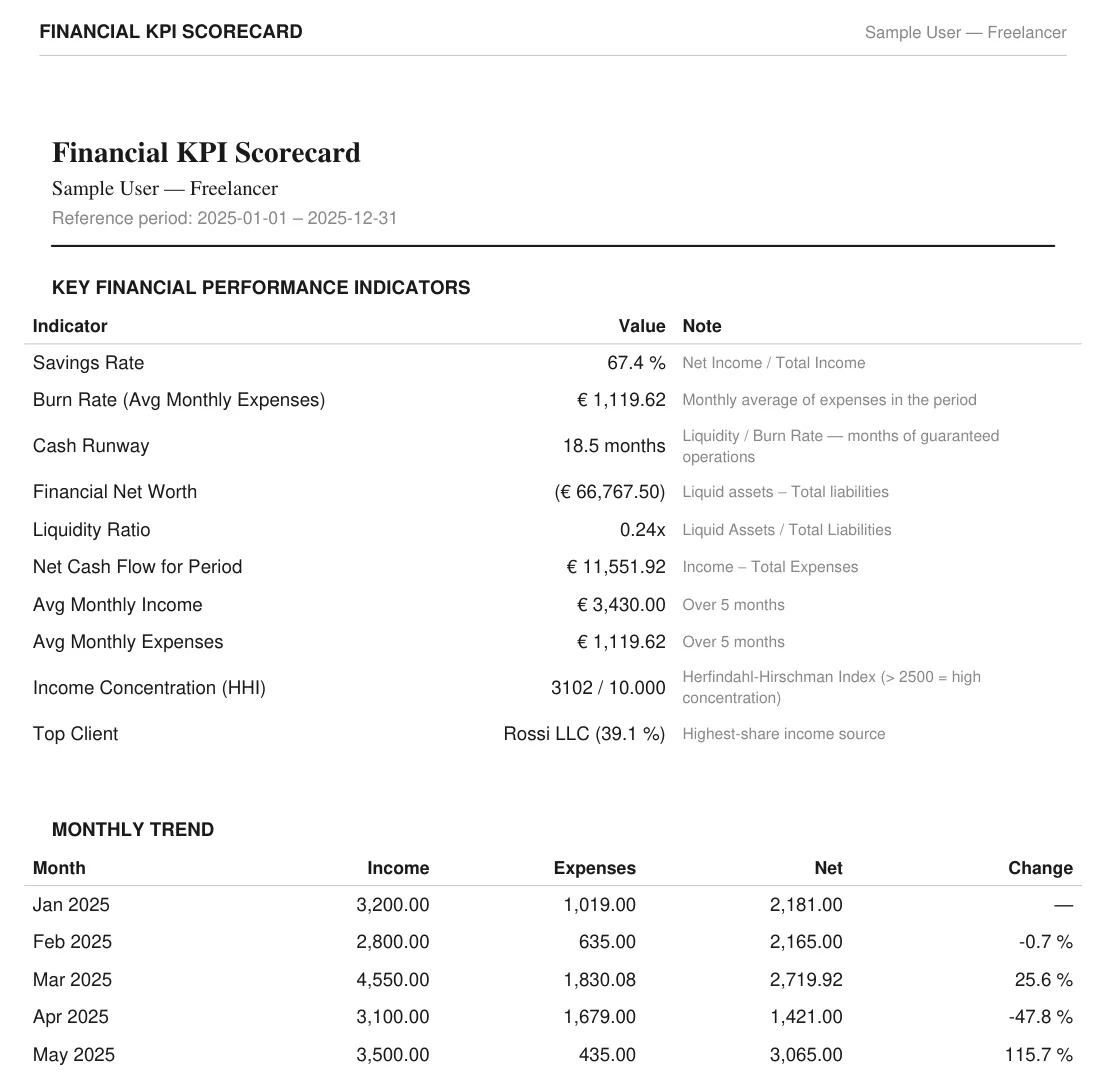
Every report comes out as a PDF; the data also lands in a single Excel workbook with one sheet per report, so you can slice the numbers further if you want. The KPI Scorecard is the one I check first:
Who it’s for
Individuals and freelancers who already keep their data in Firefly III and want a complete annual financial overview without exporting CSVs and pivoting in a spreadsheet for hours. Typical uses: archiving a year of finances, preparing numbers for your accountant or your tax return, checking whether your savings rate is going in the right direction, or just printing something you can flip through.
How it works
The tool talks to your Firefly III instance over its REST API, read-only: it never creates, modifies or deletes a single transaction. Everything runs locally on your machine — your data goes from your server to the PDFs on your disk, and nowhere else. No accounts, no telemetry, no cloud.
Try it in two minutes
Install from PyPI:
pip install firefly-iii-reports
You don’t even need a Firefly III instance to see what it looks like — the demo generates all 26 reports from mock data:
python -m firefly_reports.demo --out ./output --year 2025 --lang en
Against a real instance it’s just as simple — all you need is a Firefly III Personal Access Token:
firefly-reports \
  --url https://your-firefly-instance.example.com \
  --year 2025 \
  --owner "Your Name" --out ./output
The token can come from a flag, the FIREFLY_TOKEN environment variable, a .env file, a firefly-reports.toml config file, or an interactive prompt — whatever fits your setup. Use --start/--end instead of --year for a custom date range (year-only reports like YoY, Historical Growth and Liquidity Forecast are skipped in that mode).
Configuration file
I highly recommend generating a persistent configuration file by running the interactive wizard:
firefly-reports init
For all options, see the configuration wiki page .
What’s next
The project is GPL v3 and the full documentation lives on the GitHub Wiki — all CLI flags, config keys, and a reference for every report.
Check out the project page for more info.
If you run Firefly III and give it a spin, I’d love to hear what breaks, what’s missing, what (hopefully) works or which report you wish existed. Issues and pull requests are welcome — and if you find it useful, a star on the repo makes my day.